This is a series of articles about database schema change / database schema migration:
- What is a Database Schema? (this one)
- What is a Database Schema Migration?
- How to Handle Database Migration / Schema Change?
- Top Database Schema Migration Tools
A database management system (DBMS) consists of three main components:
- The database server
- The database data
- The database schema
The database server is a computation component and is stateless. The database data holds the state while the database schema holds the structure of the state (metadata). Database users often use SQL to instruct the database server to manipulate the underlying database data. SQL stands for Structured Query Language which is based on the structure that the database schema provides.
The database server
The database server is a process or a set of processes running inside a computation environment. The computation environment provides processing power. It could be a physical computer, a virtual machine or a lightweight container.
The database data
The database data records the business application information such as order information, customer profile, etc. The database data is stored on the physical disk. People always use a cylinder to represent a database because, in old days, database data is stored there. Oracle, the world's largest database company, headquarters are a set of cylinder buildings.

The database schema
The database schema describes the logical structure of the database data. It often resides together with the database data. A more general term is metadata, but in the database domain, it's always referred to as database schema or just schema. Other synonyms include data dictionary, data catalog, etc.
In the formal definition, a database schema is a set of formulas called integrity constraints. These constraints are defined as various database objects such as tables, fields, relationships, views, indexes, stored procedures, triggers, etc.
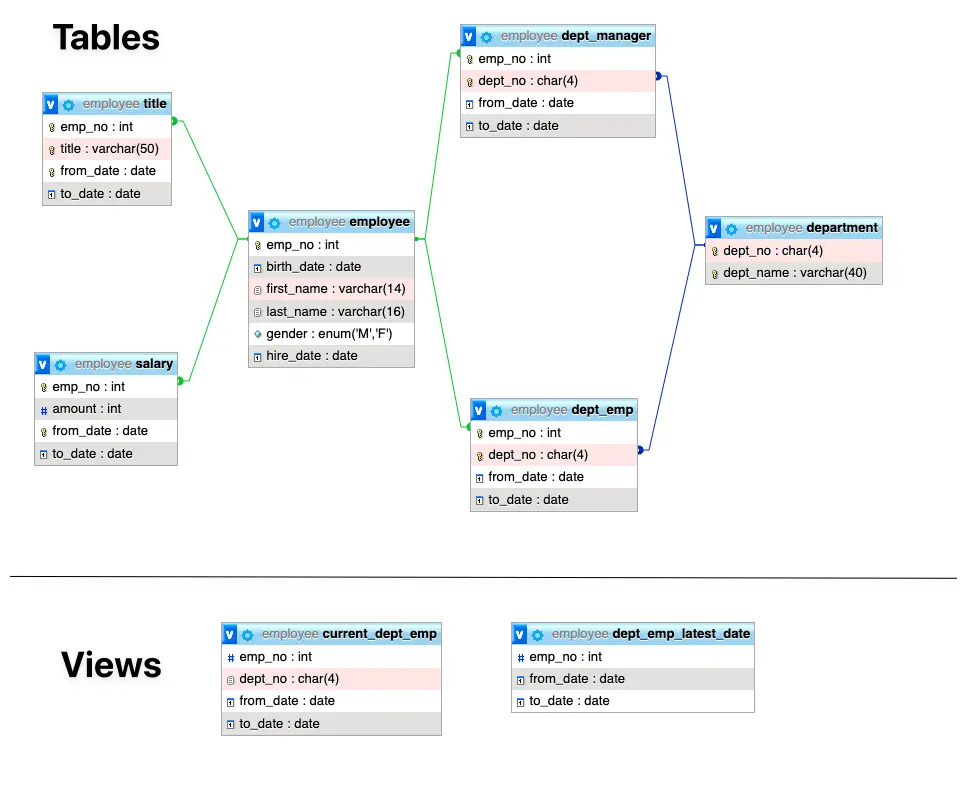
Above is a database schema for a database storing the employee data. The database schema is the blueprint of how the database data is organized. A DBMS can have a database schema with empty data, but not vice versa. The database data is meaningless without the database schema.
Database schema vs. database
A database holds the actual data (rows and records). A schema defines the structure of that data (tables, columns, types). One common source of confusion: PostgreSQL and MySQL use the word "schema" differently.
| PostgreSQL | MySQL | |
|---|---|---|
CREATE SCHEMA | Creates a namespace within a database | Synonym for CREATE DATABASE |
| A database can contain | Multiple schemas (public, sales, analytics) | One schema (the database itself) |
| Default schema | public | N/A |
In PostgreSQL, a single database can have multiple schemas, each with its own set of tables. In MySQL, "schema" and "database" mean the same thing. SQL Server uses schemas as security boundaries within a database, similar to PostgreSQL's namespaces.
Types of database schemas
Database schemas exist at three levels of abstraction:
| Level | Audience | Contains |
|---|---|---|
| Conceptual | Business stakeholders | Entities and relationships, no technical detail |
| Logical | Developers and architects | Tables, columns, keys, constraints (database-agnostic) |
| Physical | DBAs and infrastructure | Storage engine, indexes, partitions, database-specific syntax |
In practice, most teams start at the logical level. The physical schema is what actually runs in your database: the SQL DDL statements that create tables, indexes, and constraints.
For naming conventions and structural decisions, see Top 10 Database Schema Design Best Practices. For broader architectural patterns like normalization, star schema, and multi-tenant designs, see Database Design Patterns Every Developer Should Know.
How database schemas evolve
Database schema evolves as the business evolves. These changes are called schema migrations, and they require more care than application code changes because a bad migration can lock tables, cause downtime, or break running applications.
Teams typically manage schema changes through versioned migration files. For the full process, see How to Handle Database Schema Change.
When schema changes happen outside the migration process (manual ALTER TABLE in production, for example), the actual database structure drifts from what the migration files describe. This is called schema drift, and it causes deployment failures and data inconsistencies.
Bytebase is a database DevSecOps platform that helps teams manage this lifecycle with SQL review, schema drift detection, and migration history tracking across multiple databases.
FAQ
What is the difference between a schema and a database instance?
A schema is the structure (tables, columns, types). An instance is the data stored in that structure at a given point in time. The schema rarely changes; the instance changes with every INSERT, UPDATE, or DELETE.
Can a database exist without a schema?
Not in a relational database. Every table has a defined structure. NoSQL databases like MongoDB are sometimes called "schemaless," but they still have implicit structure in the documents they store.
What tools can I use to visualize a database schema?
Most database GUI clients (DBeaver, pgAdmin, MySQL Workbench) can generate ER diagrams from an existing database. See Top Database Schema Diagram Tools for more options.